Display a breadcrumb in proposals
Git Town can render a visual breadcrumb in proposals that shows where the current branch sits within its stack. This makes stacked changes explicit and easier to review.
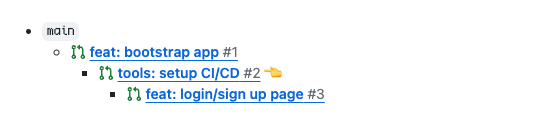
These breadcrumbs are kept up to date automatically when you:
- propose a branch
- sync branches
- ship a branch
- delete a branch
- prepend a branch
- detach a branch
- change the parent of a branch
- combine branches
- swap branches
There are two ways to maintain breadcrumbs. You only need to enable one of them.
Use the Git Town executable
The Git Town CLI can create and update breadcrumbs. This approach works across all supported forges and doesn’t require any CI or workflow changes. Breadcrumbs only get updated if branch changes happen through the Git Town CLI.
To enable this behavior, set proposal-breadcrumb to one of the following values:
branchesto display breadcrumbs for all branchesstacksto display breadcrumbs only for stacks that contain more than one branchnoneto not display breadcrumbs
You can also set proposal-breadcrumb-direction:
downprints the breadcrumb from the root downupprints the breadcrumb from the root up
Use the GitHub action
If your team standardizes on Git Town and uses GitHub, you can set up the Git Town GitHub action to automatically add and update breadcrumbs on all pull requests. This offloads the update workload to CI and ensures breadcrumbs get updated even when changes are made outside the local Git Town CLI.
To enable this behavior, set up the GitHub Action.